
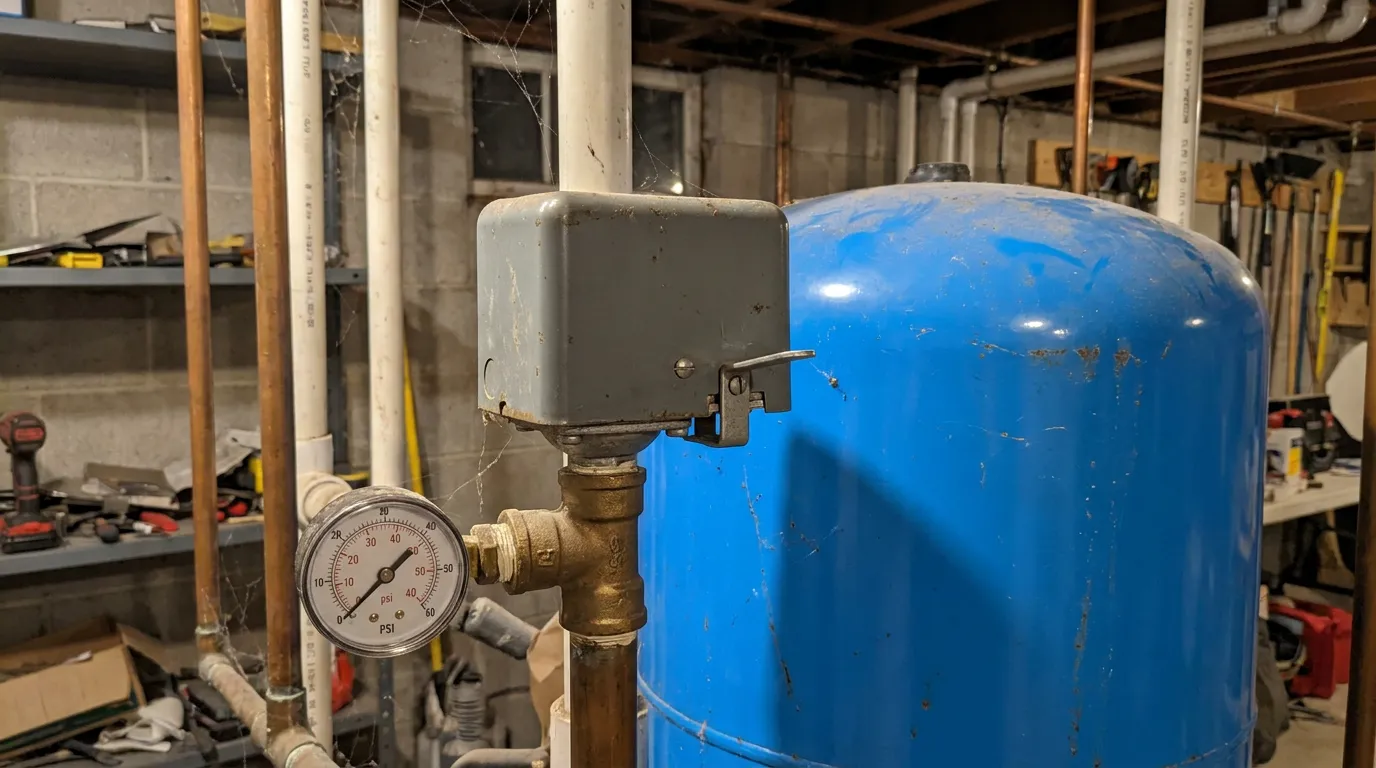
A well pump pressure switch reset depends on the design. If your well pressure switch has an external low-pressure cut-off (LPCO) lever, that lever may provide the manufacturer-designed way to restart the pump after a low-pressure trip. If your switch has no external lever, there usually isn't a hidden reset inside the enclosure — opening the cover and manipulating the contacts is not a substitute for one, and it isn't something this guide walks you through.
Before doing anything, it helps to know which situation you're actually in: a standard mechanical switch, a mechanical switch with an LPCO lever, or an electronic constant-pressure controller. Only one of those has a homeowner-operable reset lever that's actually documented by its manufacturer.
One thing worth saying up front: resetting restores operation. It doesn't correct whatever caused pressure to drop in the first place. If that underlying cause is still there, the fix is diagnosis — not another reset.
Table of Contents
First, Identify What Kind of System You Have
Standard Mechanical Pressure Switch
No external LPCO/reset lever
No homeowner manual reset at the pressure switch
Low-Pressure Cut-Off (LPCO) Switch
External Start/Auto/Off-style lever
Manual restart function on documented LPCO models
A. Standard mechanical pressure switch – no external LPCO lever. This type responds automatically to your system's cut-in and cut-out pressure, cycling the pump on and off on its own. It normally has no homeowner manual reset at the switch itself, and there's no hidden reset waiting under the cover. If the pump won't start, that points to something else – see "Without a Lever," below.
B. Mechanical low-pressure cut-off (LPCO) switch – external lever. These have a visible external lever you can see and operate with the cover closed, commonly working through Off, Start, and Auto-style positions (exact labeling and behavior vary by manufacturer and model). The LPCO feature protects the pump by latching the switch off when pressure falls well below normal. This is the only category this article gives a reset procedure for.
C. Constant-pressure / VFD controller. A fundamentally different, electronic system: fault codes and its own restart logic instead of a mechanical lever. Franklin Electric's SubDrive-family controllers, for example, flag a fault when the drive detects a low-water or underload condition, and recovery is governed by the controller's own settings and logic rather than a lever you hold. There's no LPCO lever here. Other electronic controllers follow the same general pattern – model-specific fault codes and restart behavior – and should be handled per their own documentation, not the steps in this article.
How Do You Reset a Well Pump Pressure Switch Without a Lever?
If a standard mechanical well pressure switch has no external low-pressure cut-off lever, there normally isn't a manual pressure-switch reset for a homeowner to perform. Don't remove the cover looking for a hidden reset, and don't press the internal contacts. If the pump won't start, the next step is figuring out what's actually preventing it from running, not searching for a reset that isn't there.
Two things get confused with a "hidden reset" often enough to call out specifically:
A separate control box. Some three-wire submersible-pump systems use a separate motor control box mounted away from the pressure switch, often on a nearby wall. Franklin Electric, for example, documents external access to overload resets on its Standard, Deluxe, and XL Deluxe control boxes. That reset belongs to the motor control box, not the pressure switch, other control-box designs, including other manufacturers' boxes and Franklin's own Quick Disconnect (QD) boxes, may work differently. Check your control box's own model and instructions before assuming this applies to yours.
An electronic controller. If your system uses a constant-pressure controller instead of a mechanical switch, it may show a fault code and restart on its own logic, as described above. That's also not a pressure-switch reset.
Check the Breaker First
Check the labeled pump breaker before assuming the pressure switch needs a reset. This means flipping the labeled breaker fully off, then firmly back on, nothing more.
What the Low-Pressure Cut-Off Lever Actually Does
An LPCO switch adds one function on top of normal cut-in/cut-out cycling: it shuts the pump off – and keeps it off – once pressure falls substantially below the normal cut-in point, instead of letting the pump keep running against a low-pressure or dry-well condition.
On Schneider Electric / Square D's Pumptrol M4 option specifically, Schneider documents a pressure drop of roughly 10 psi below cut-in as moving the switch to a maintained off position, with "no automatic way to exit the low pressure cut off", the lever is spring-loaded into Start and has to be held against that spring while pressure recovers. This 10-psi figure is specific to Schneider's M4 option, not a universal number for other brands.
Boshart's own LPCO documentation independently describes the same lever-hold mechanism, corroborating it as a common design pattern. Boshart documents its LPCO switches as cutting out at approximately 10 psi below the switch's cut-in pressure, its published examples show an LPCO trip near 10 psi on a 20/40 switch, 20 psi on a 30/50 switch, and 30 psi on a 40/60 switch. Those are the resulting absolute trip pressures for each model, not a 10, 20, and 30 psi differential below cut-in. Use Boshart's own documentation for a Boshart switch, Schneider's for a Schneider switch, the two aren't merged into one figure.
The important takeaway either way: resetting restores operation. It does not correct why pressure fell in the first place.
Why Did the Low-Pressure Cut-Off Trip?
A handful of causes show up repeatedly. The reset itself only tells you the switch tripped not why.
- Well drawdown or insufficient supply. Heavy demand – irrigation, filling a pool or tank, several fixtures at once – can pull the well down faster than it recharges.
- A plumbing leak or burst pipe. Pressure keeps falling because water is escaping somewhere, even while the pump tries to keep up.
- A pump capacity or performance problem. The pump may not build or hold enough pressure under demand.
- A check-valve, foot-valve, or leak-back issue. Pressure bleeds away, often overnight, needs professional diagnosis, not a homeowner check.
- A jet pump that has lost prime. A separate mechanism from an LPCO trip – see "Lost Prime," below.
- The cut-in setting sitting too close to the tank's precharge pressure. Boshart's troubleshooting documentation flags this as a leading cause of nuisance LPCO tripping, recommending a minimum 2–5 psi gap (a 30 psi cut-in calling for precharge no higher than 25–28 psi), noting seasonal swings can shrink that gap further. Overlaps with Well Pump Short Cycling.
- A freeze or other seasonal issue. Situationally.
A power outage, on its own, isn't a root mechanical cause, it's a trigger for one of the causes above. That's next.
Well Pump Pressure Switch Reset After a Power Outage
A power outage doesn't trip an LPCO switch by itself. While the pump is without power, ongoing water use – or a pressure-loss condition that already existed – can let system pressure fall below the switch's trip point. When power returns, the breaker may be fine, but the LPCO switch can still be latched off, waiting to be manually restarted.
A few things don't change just because there was an outage: a standard switch with no lever still doesn't gain a manual reset; an electronic constant-pressure controller follows its own restart logic regardless; and a jet pump can have a separate lost-prime problem that an outage may reveal rather than cause (see below).
Recommended sequence:
- Make sure the area and equipment are dry, with no obvious leak or electrical damage.
- Check the labeled pump breaker.
- Identify whether your pressure switch actually has an external LPCO lever (see "Identify What Kind of System You Have," above).
- If it's a documented LPCO-lever switch and the underlying low-pressure cause has been addressed, follow the reset procedure below for your specific switch.
- If pressure doesn't recover, or the switch trips again shortly after, stop resetting and move to diagnosis rather than repeating the reset.
No breaker-panel work beyond operating the labeled breaker is covered here or needed for this.
How to Reset a Lever-Equipped Low-Pressure Cut-Off Switch
These steps apply to documented mechanical LPCO switches that use an external Start/Auto-style lever, such as Square D's M4 option and comparable Boshart LPCO designs. If the markings on your switch or its own manual describe a different sequence, follow your switch's instructions instead of this one.
- Step 1. Confirm it's really an LPCO lever. It's external, and the cover stays closed the entire time.
- Step 2. Look for the reason pressure was lost before you reset anything. Don't reset if you see an obvious burst pipe or leak, a known dry or very low well, damaged electrical equipment, water inside or around the switch, or a breaker that keeps tripping. Any of those calls for a professional rather than a reset attempt.
- Step 3. Check the labeled pump breaker. No panel work, no wiring, just the labeled breaker, off and back on.
- Step 4. Move the external lever to Start, as documented for your specific switch. Cover stays closed. No tools. No touching internal contacts.
- Step 5. Hold Start while pressure rebuilds, watching the gauge, not a clock. There's no universal hold time here, and this guide isn't going to invent one. For Schneider's M4 option, the manufacturer's instructions say to correct the system fault first, move the external lever to Start, and hold it there until enough system pressure has returned for normal switch operation to resume. For Boshart-equipped switches, follow Boshart's own guidance the same way: hold the lever in the Start position while pressure is restored, and the switch resumes normal operation once you release it. Either way, the release condition is pressure-based, not time-based — watch the gauge and follow the reset condition specified for your exact switch.
- Step 6. Release to Auto once your switch's documented condition is met. The pump should return to normal automatic cycling.
- Step 7. If pressure won't build, or the switch trips again almost immediately, stop. Don't hold the lever longer, don't reset it again, don't force it, and don't open the switch. Move to "If the Pump Still Won't Start," below.
If the Lever Won't Stay in Auto
If the lever won't stay in Auto after a reset attempt, the most likely explanation is that the system hasn't rebuilt enough pressure, or the switch is still sensing a low-pressure condition, pointing back to one of the causes above, not to a defect by itself. Other possibilities include a problem in the sensing path, a fault in the switch, an inaccurate gauge, or a pump or well problem. A lever that won't hold doesn't by itself prove the switch is good or bad.
What matters more than the diagnosis: don't hold the lever indefinitely, and don't keep repeating the reset. If pressure won't recover, that's a signal for professional diagnosis, not a longer hold.
Lost Prime vs. a Tripped Pressure Switch
A jet pump can fail to regain pressure because it's lost prime, a separate problem from an LPCO trip, though both can look like "the pump just won't come back on." An outage can reveal a lost-prime problem, for instance if water drains back down the suction line while the pump is off. Loss of prime can point to a suction-side or leak-back problem that existed before the outage or became apparent during it. This guide doesn't cover locating a priming plug, opening the housing, or refilling the pump, for broader diagnosis, start with Well Pump Not Working.
If the Pump Still Won't Start
A reset that doesn't restore water points to something beyond the switch itself: a well not recovering fast enough, a pump not building adequate pressure, lost prime on a jet-pump system, a check-valve or foot-valve issue, a leak, a sensing or switch problem, or a pump/control/electrical issue. The lever alone doesn't tell you which, that's a diagnosis question, not something to read off how the reset behaved.
For broader troubleshooting, start with Well Pump Not Working; for switch-specific symptoms, see Well Pump Pressure Switch Problems. Neither page – nor this one – covers live electrical testing; that's professional work.
Resetting Is Not the Same as Adjusting or Replacing the Switch
Resetting restores operation after a protective LPCO trip, on a switch built with an external lever for that purpose. It doesn't change any of the switch's settings.
Adjusting a pressure switch means changing its cut-in and cut-out pressure – a different task entirely, done with a different set of internal adjustment nuts, and outside the scope of this article.
Replacing the switch means installing a new one, which involves wiring and is also outside the scope of this article.
If you've confirmed the switch trips repeatedly even with the underlying pressure cause addressed, or if it won't hold a reset at all, that's a signal to have it professionally diagnosed — which may lead to an adjustment or a replacement, but neither is something to attempt from this guide.
Opening the Switch Isn't a "Reset" – It's Servicing
If your switch has no external LPCO lever, opening the cover and manually pushing the contacts closed is not a "reset", it's electrical servicing of a mains-voltage enclosure, and it defeats the exact protection the switch exists to provide. Schneider Electric's own Pumptrol instruction sheet is explicit that power must be disconnected before any servicing and that the cover has to be secured before power is restored, which is the opposite of holding a live enclosure open to press its contacts. This guide doesn't include that procedure, and it isn't something to attempt without being qualified to work inside a mains-voltage electrical enclosure.
Constant-Pressure and VFD Systems
Electronic constant-pressure systems work differently from a mechanical pressure switch, and their recovery process isn't the same as holding a lever. Franklin Electric's SubDrive-family controllers, for example, are documented to flag a specific fault when the drive detects the pump running under load conditions consistent with a low-water or dry-run situation, and recovery from that state – along with recovery from other fault conditions – is governed by the controller's own logic and settings rather than by a homeowner operating an external lever.
Other manufacturers' electronic controllers follow the same general pattern of model-specific fault codes and restart behavior. This article doesn't walk through any controller's settings or fault-code sequence, if your system uses one of these controllers, its own documentation is the right source for recovery steps.
Well Pump Pressure Switch Reset: Quick Diagnostic Table
| What you see | What it may mean | Is another reset appropriate? | Next step |
|---|---|---|---|
| External LPCO lever tripped once, cause identified and corrected | Normal protective trip | Yes, once | Follow the lever reset procedure |
| No external lever on the switch | Standard switch — no built-in homeowner reset | No | Check the breaker, then diagnose |
| Lever won’t stay in Auto after reset | Pressure hasn’t recovered, or condition persists | No, not repeatedly | Diagnose the underlying cause |
| Pressure doesn’t rise while holding Start | Underlying cause unresolved, or switch/sensing issue | No | Stop and diagnose |
| Switch trips again shortly after reset | Underlying cause still present | No | Stop resetting; professional diagnosis |
| Breaker trips (not just the LPCO lever) | Electrical fault, separate from the pressure switch | No | Do not keep resetting the breaker; call a professional |
| Jet pump, no pressure build at all | May have lost prime rather than an LPCO trip | Not applicable | See “Lost Prime vs. a Tripped Pressure Switch” |
| Electronic/VFD controller shows a fault | Not a mechanical LPCO trip | Not applicable | Follow the controller’s own documentation |
FAQ
How do I reset my well pump pressure switch?
A well pump pressure switch reset depends on the switch. If it has an external low-pressure cut-off lever, the procedure above applies once the underlying pressure cause has been addressed. If it doesn't have that lever, there normally isn't a homeowner reset to perform at the switch – see "Without a Lever."
How do I reset a well pressure switch without a lever?
In most cases, you don't – a standard switch without an LPCO lever doesn't have a homeowner-operable reset. Opening the cover to press the contacts isn't a substitute; it's servicing an energized enclosure. If the pump won't start, check the breaker and move to diagnosis.
Why doesn't my pressure switch have a lever?
Plenty of standard mechanical pressure switches are built without the low-pressure cut-off option at all – LPCO is an added feature, not something every switch includes.
How long do I hold the pressure-switch lever?
There's no universal time. Hold it according to your switch manufacturer's pressure-based release condition – watching the gauge, not a stopwatch – rather than any fixed number of seconds.
Why won't the lever stay in Auto?
Most often it means the system hasn't rebuilt enough pressure yet, or the switch is still sensing a low-pressure condition – pointing back to whatever caused the pressure loss. Don't force it or hold it indefinitely; if pressure won't recover, that calls for diagnosis.
What causes a low-pressure cut-off switch to trip?
Well drawdown, a leak, a pump capacity problem, a check-valve or foot-valve issue, lost prime on a jet pump, the cut-in setting sitting too close to the tank's precharge pressure, or a seasonal issue like freezing. See "Why Did the Low-Pressure Cut-Off Trip?" above.
Why is there no water after a power outage?
It could be a latched LPCO switch waiting to be reset, a still-tripped breaker, a lost-prime jet pump, or an unrelated leak or supply issue – a power outage doesn't automatically mean any one of these. Work through the sequence in "After a Power Outage," above.
Is there a reset button on a well pump?
Not usually at a standard pressure switch. Some separate control boxes or electronic controllers do have their own external reset or fault-clear function, but that depends entirely on the model – check your specific equipment rather than assuming.
Do I need to prime my pump after a power outage?
Only in some jet-pump failure scenarios, and an outage by itself doesn't establish that prime was lost. See "Lost Prime vs. a Tripped Pressure Switch," above, and Well Pump Not Working for further diagnosis.